搜索到
20
篇与
的结果
-
 Git commit 注释规范 第一类{card-default label="type" width="100%"} type用于说明 commit 的类别,只允许使用下面8个标识。 br: 此项特别针对bug号,用于向测试反馈bug列表的bug修改情况 feat:新功能(feature) fix:修补bug docs:文档(documentation) style: 格式(不影响代码运行的变动) refactor:重构(即不是新增功能,也不是修改bug的代码变动) test:增加测试 chore:构建过程或辅助工具的变动 revert: feat(pencil): add 'graphiteWidth' option (撤销之前的commit){/card-default}第二类{card-default label="scope" width="100%"} scope用于说明 commit 影响的范围,比如数据层、控制层、视图层等等,视项目不同而不同。{/card-default}第三类{card-default label="subject" width="100%"} subject是 commit 目的的简短描述,不超过50个字符。 以动词开头,使用第一人称现在时,比如change,而不是changed或changes, 第一个字母小写,结尾不加句号(.){/card-default}第四类{card-default label="Body" width="100%"} Body 部分是对本次 commit 的详细描述,可以分成多行。 {/card-default}
 -
-
"IAuthorizationFilter" 简单使用 - .Net Core - WebAPI 为什么要做这个 最近在做权限验证的时候,开始使用JWT封装的一些验证,最后发现满足不了我的一些需求,而且改动起来也比较麻烦。经过几天的验证之后,绝对弃用JWTToken的验证,改用IAuthorizationFilter这个过滤器。 ## 最终效果 实现访问接口的时候,根据自定义的规则进行过滤用法 1、新建一个类,继承Attribute(.net特性,具体信息自行查阅)、IAuthorizationFilterpublic class ApiAuthorize : Attribute, IAuthorizationFilter { public void OnAuthorization(AuthorizationFilterContext context) { string token = context.HttpContext.Request.Headers["Authorization"].ToString(); //具体过滤规则 } } 2、使用[TypeFilter(typeof(ApiAuthorize))] [HttpGet,Route("Test")] public async Task<JsonResult> Test() { return RenderSuccess(); }关于要使用TypeFilter的原因,因为我在ApiAuthorize里面构造了一些东西,需要需要这个才能引进去。 {callout color="#f0ad4e"} 以上是我自己的个人心得笔记,如有不对,请指正!!! {/callout}
-
-
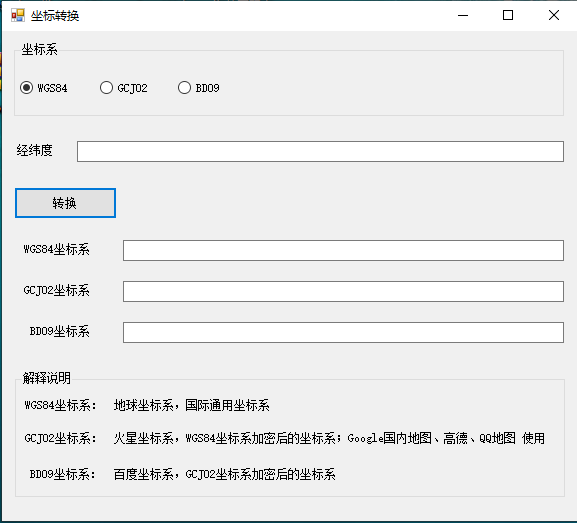
GPS,高德,百度,谷歌坐标系转换 GPS、高德坐标系互转,高德、百度坐标系互转。。。后面有我自己随便写写,但是可以用的成品demo,已经开源先直接上干活,转换的类public class GPSChange { private const double pi = 3.14159265358979324; private const double x_pi = 3.14159265358979324 * 3000.0 / 180.0; //克拉索天斯基椭球体参数值 private const double a = 6378245.0; //第一偏心率 private const double ee = 0.00669342162296594323; /// <summary> /// GCJ-02转换BD-09 /// </summary> /// <param name="gg_lat">纬度</param> /// <param name="gg_lon">经度</param> /// <returns></returns> public static CoordinatesHelper GCJ02_to_BD09(double gg_lat, double gg_lon) { CoordinatesHelper point = new CoordinatesHelper(); double x = gg_lon, y = gg_lat; double z = Math.Sqrt(x * x + y * y) + 0.00002 * Math.Sin(y * x_pi); double theta = Math.Atan2(y, x) + 0.000003 * Math.Cos(x * x_pi); double bd_lon = z * Math.Cos(theta) + 0.0065; double bd_lat = z * Math.Sin(theta) + 0.006; point.SetLat(bd_lat); point.SetLng(bd_lon); return point; } /// <summary> /// BD-09转换GCJ-02 /// </summary> /// <param name="bd_lat">纬度</param> /// <param name="bd_lon">经度</param> /// <returns></returns> public static CoordinatesHelper BD09_to_GCJ02(double bd_lat, double bd_lon) { CoordinatesHelper point = new CoordinatesHelper(); double x = bd_lon - 0.0065, y = bd_lat - 0.006; double z = Math.Sqrt(x * x + y * y) - 0.00002 * Math.Sin(y * pi); double theta = Math.Atan2(y, x) - 0.000003 * Math.Cos(x * pi); double gg_lon = z * Math.Cos(theta); double gg_lat = z * Math.Sin(theta); point.SetLat(gg_lat); point.SetLng(gg_lon); return point; } /// <summary> /// WGS-84转换GCJ-02 GPS转高德 /// </summary> /// <param name="wgLat">纬度</param> /// <param name="wgLon">经度</param> /// <returns></returns> public static CoordinatesHelper WGS84_to_GCJ02(double wgLat, double wgLon) { CoordinatesHelper point = new CoordinatesHelper(); if (OutOfChina(wgLat, wgLon)) { point.SetLat(wgLat); point.SetLng(wgLon); return point; } double dLat = TransformLat(wgLon - 105.0, wgLat - 35.0); double dLon = TransformLon(wgLon - 105.0, wgLat - 35.0); double radLat = wgLat / 180.0 * pi; double magic = Math.Sin(radLat); magic = 1 - ee * magic * magic; double sqrtMagic = Math.Sqrt(magic); dLat = (dLat * 180.0) / ((a * (1 - ee)) / (magic * sqrtMagic) * pi); dLon = (dLon * 180.0) / (a / sqrtMagic * Math.Cos(radLat) * pi); double lat = wgLat + dLat; double lon = wgLon + dLon; point.SetLat(lat); point.SetLng(lon); return point; } /// <summary> /// 高德转GPS /// </summary> /// <param name="wgLat"></param> /// <param name="wgLon"></param> /// <returns></returns> public static CoordinatesHelper GCJ02_to_WGS84(double wgLat, double wgLon) { CoordinatesHelper point = new CoordinatesHelper(); if (OutOfChina(wgLat, wgLon)) { point.SetLat(wgLat); point.SetLng(wgLon); return point; } var a = 6378245.0; // a: 卫星椭球坐标投影到平面地图坐标系的投影因子。 var ee = 0.00669342162296594323; // ee: 椭球的偏心率。 var lat = +wgLat; var lng = +wgLon; var dlat = transformLat(lng - 105.0, lat - 35.0); var dlng = transformLon(lng - 105.0, lat - 35.0); var radlat = lat / 180.0 * PI; var magic = Math.Sin(radlat); magic = 1 - ee * magic * magic; var sqrtmagic = Math.Sqrt(magic); dlat = (dlat * 180.0) / ((a * (1 - ee)) / (magic * sqrtmagic) * PI); dlng = (dlng * 180.0) / (a / sqrtmagic * Math.Cos(radlat) * PI); var mglat = lat + dlat; var mglng = lng + dlng; point.SetLat(lat * 2 - mglat); point.SetLng(lng * 2 - mglng); return point; } public static CoordinatesHelper WGS84_to_BD09(double wgLat, double wgLon) { //先转GCJ-02 CoordinatesHelper point = new CoordinatesHelper(); var info = WGS84_to_GCJ02(wgLat, wgLon); double lat = info.GetLat(); double lon = info.GetLng(); //第二次转 return GCJ02_to_BD09(lat, lon); } public static CoordinatesHelper BD09_to_WGS84(double wgLat, double wgLon) { double x = wgLon - 0.0065, y = wgLat - 0.006; double z = Math.Sqrt(x * x + y * y) - 0.00002 * Math.Sin(y * pi); double theta = Math.Atan2(y, x) - 0.000003 * Math.Cos(x * pi); double gg_lon = z * Math.Cos(theta); double gg_lat = z * Math.Sin(theta); //先转GCJ-02 CoordinatesHelper point = new CoordinatesHelper(); return GCJ02_to_WGS84(gg_lat, gg_lon); } public static double PI = 3.14159265358979324; public static double transformLat(double x, double y) { var ret = -100.0 + 2.0 * x + 3.0 * y + 0.2 * y * y + 0.1 * x * y + 0.2 * Math.Sqrt(Math.Abs(x)); ret += (20.0 * Math.Sin(6.0 * x * PI) + 20.0 * Math.Sin(2.0 * x * PI)) * 2.0 / 3.0; ret += (20.0 * Math.Sin(y * PI) + 40.0 * Math.Sin(y / 3.0 * PI)) * 2.0 / 3.0; ret += (160.0 * Math.Sin(y / 12.0 * PI) + 320 * Math.Sin(y * PI / 30.0)) * 2.0 / 3.0; return ret; } public static double transformLon(double x, double y) { var ret = 300.0 + x + 2.0 * y + 0.1 * x * x + 0.1 * x * y + 0.1 * Math.Sqrt(Math.Abs(x)); ret += (20.0 * Math.Sin(6.0 * x * PI) + 20.0 * Math.Sin(2.0 * x * PI)) * 2.0 / 3.0; ret += (20.0 * Math.Sin(x * PI) + 40.0 * Math.Sin(x / 3.0 * PI)) * 2.0 / 3.0; ret += (150.0 * Math.Sin(x / 12.0 * PI) + 300.0 * Math.Sin(x / 30.0 * PI)) * 2.0 / 3.0; return ret; } public static void Transform(double wgLat, double wgLon, double[] latlng) { if (OutOfChina(wgLat, wgLon)) { latlng[0] = wgLat; latlng[1] = wgLon; return; } double dLat = TransformLat(wgLon - 105.0, wgLat - 35.0); double dLon = TransformLon(wgLon - 105.0, wgLat - 35.0); double radLat = wgLat / 180.0 * pi; double magic = Math.Sin(radLat); magic = 1 - ee * magic * magic; double sqrtMagic = Math.Sqrt(magic); dLat = (dLat * 180.0) / ((a * (1 - ee)) / (magic * sqrtMagic) * pi); dLon = (dLon * 180.0) / (a / sqrtMagic * Math.Cos(radLat) * pi); latlng[0] = wgLat + dLat; latlng[1] = wgLon + dLon; } private static bool OutOfChina(double lat, double lon) { if (lon < 72.004 || lon > 137.8347) return true; if (lat < 0.8293 || lat > 55.8271) return true; return false; } private static double TransformLat(double x, double y) { double ret = -100.0 + 2.0 * x + 3.0 * y + 0.2 * y * y + 0.1 * x * y + 0.2 * Math.Sqrt(Math.Abs(x)); ret += (20.0 * Math.Sin(6.0 * x * pi) + 20.0 * Math.Sin(2.0 * x * pi)) * 2.0 / 3.0; ret += (20.0 * Math.Sin(y * pi) + 40.0 * Math.Sin(y / 3.0 * pi)) * 2.0 / 3.0; ret += (160.0 * Math.Sin(y / 12.0 * pi) + 320 * Math.Sin(y * pi / 30.0)) * 2.0 / 3.0; return ret; } private static double TransformLon(double x, double y) { double ret = 300.0 + x + 2.0 * y + 0.1 * x * x + 0.1 * x * y + 0.1 * Math.Sqrt(Math.Abs(x)); ret += (20.0 * Math.Sin(6.0 * x * pi) + 20.0 * Math.Sin(2.0 * x * pi)) * 2.0 / 3.0; ret += (20.0 * Math.Sin(x * pi) + 40.0 * Math.Sin(x / 3.0 * pi)) * 2.0 / 3.0; ret += (150.0 * Math.Sin(x / 12.0 * pi) + 300.0 * Math.Sin(x / 30.0 * pi)) * 2.0 / 3.0; return ret; } private const double EARTH_RADIUS = 6378.137; private static double rad(double d) { return d * Math.PI / 180.0; } public static double GetDistance(double lng1, double lat1, double lng2, double lat2) { double radLat1 = rad(lat1); double radLat2 = rad(lat2); double a = radLat1 - radLat2; double b = rad(lng1) - rad(lng2); double s = 2 * Math.Asin(Math.Sqrt(Math.Pow(Math.Sin(a / 2), 2) + Math.Cos(radLat1) * Math.Cos(radLat2) * Math.Pow(Math.Sin(b / 2), 2))); s = s * EARTH_RADIUS; s = Math.Round(s * 10000) / 10000; return s; } }用法一看就懂,应该不需要我来说了吧Github开源地址:https://github.com/Hmister/Coordinates.git软件截图